everything about computer
What is computer?
A computer is a digital electronic machine that can be programmed to carry out sequences of arithmetic or logical operations automatically. Modern computers can perform generic sets of operations known as programs. These programs enable computers to perform a wide range of tasks and a computer is a programmable electronic device that accepts raw data as input and processes it with a set of instructions (a program) to produce the result as output. It renders output just after performing mathematical and logical operations and can save the output for future use.

It can process numerical as well as non-numerical calculations. The term "computer" is derived from the Latin word "computare" which means to calculate.
A computer is designed to execute applications and provides a variety of solutions through integrated hardware and software components. It works with the help of programs and represents the decimal numbers through a string of binary digits. It also has a memory that stores the data, programs, and result of processing.
The components of a computer such as machinery that includes wires, transistors, circuits, hard disk are called hardware. Whereas, the programs and data are called software.
It is believed that the Analytical Engine was the first computer which was invented by Charles Babbage in 1837. It used punch cards as read-only memory. Charles Babbage is also known as the father of the computer.
The basic parts without which a computer cannot work are as follows:
- Processor: It executes instructions from software and hardware.
- Memory: It is the primary memory for data transfer between the CPU and storage.
- Motherboard: It is the part that connects all other parts or components of a computer.
- Storage Device: It permanently stores the data, e.g., hard drive.
- Input Device: It allows you to communicate with the computer or to input data, e.g., a keyboard.
- Output Device: It enables you to see the output, e.g., monitor.
Features of a Computer
1. Speed: – As you know computer can work very fast. It takes only few seconds for calculations that we take hours to complete. You will be surprised to know that computer can perform millions (1,000,000) of instructions and even more per second.
Therefore, we determine the speed of computer in terms of microsecond (10-6 part of a second) or nanosecond (10 to the power -9 part of a second). From this you can imagine how fast your computer performs work.
2. Accuracy: – The degree of accuracy of computer is very high and every calculation is performed with the same accuracy. The accuracy level is 7.
determined on the basis of design of computer. The errors in computer are due to human and inaccurate data.
3. Diligence: – A computer is free from tiredness, lack of concentration, fatigue, etc. It can work for hours without creating any error. If millions of calculations are to be performed, a computer will perform every calculation with the same accuracy. Due to this capability it overpowers human being in routine type of work.
4. Versatility: – It means the capacity to perform completely different type of work. You may use your computer to prepare payroll slips. Next moment you may use it for inventory management or to prepare electric bills.
5. Power of Remembering: – Computer has the power of storing any amount of information or data. Any information can be stored and recalled as long as you require it, for any numbers of years. It depends entirely upon you how much data you want to store in a computer and when to lose or retrieve these data.
6. No IQ: – Computer is a dumb machine and it cannot do any work without instruction from the user. It performs the instructions at tremendous speed and with accuracy. It is you to decide what you want to do and in what sequence. So a computer cannot take its own decision as you can.
7. No Feeling: – It does not have feelings or emotion, taste, knowledge and experience. Thus it does not get tired even after long hours of work. It does not distinguish between users.
8. Storage: – The Computer has an in-built memory where it can store a large amount of data. You can also store data in secondary storage devices such as floppies, which can be kept outside your computer and can be carried to other computers.
Computers are divided into different types based on different criteria. Based on the size, a computer can be divided into five types:
- Micro Computer
- Mini Computer
- Mainframe Computer
- Super Computer
- Workstations
1. Micro Computer:
It is a single-user computer which has less speed and storage capacity than the other types. It uses a microprocessor as a CPU. The first microcomputer was built with 8-bit microprocessor chips. The common examples of microcomputers include laptops, desktop computers, personal digital assistant (PDA), tablets, and smartphones. Microcomputers are generally designed and developed for general usage like browsing, searching for information, internet, MS Office, social media, etc.
2. Mini Computer:
Mini-computers are also known as "Midrange Computers." They are not designed for a single. They are multi-user computers designed to support multiple users simultaneously. So, they are generally used by small businesses and firms. Individual departments of a company use these computers for specific purposes. For example, the admission department of a University can use a Mini-computer for monitoring the admission process.
3. Mainframe Computer:
It is also a multi-user computer capable of supporting thousands of users simultaneously. They are used by large firms and government organizations to run their business operations as they can store and process large amounts of data. For example, Banks, universities, and insurance companies use mainframe computers to store the data of their customers, students, and policyholders, respectively.
4. Super Computer:
Super-computers are the fastest and most expensive computers among all types of computers. They have huge storage capacities and computing speeds and thus can perform millions of instructions per second. The super-computers are task-specific and thus used for specialized applications such as large-scale numerical problems in scientific and engineering disciplines including applications in electronics, petroleum engineering, weather forecasting, medicine, space research and more. For example, NASA uses supercomputers for launching space satellites and monitoring and controlling them for space exploration.
5. Work stations:
It is a single-user computer. Although it is like a personal computer, it has a more powerful microprocessor and a higher-quality monitor than a microcomputer. In terms of storage capacity and speed, it comes between a personal computer and minicomputer. Work stations are generally used for specialized applications such as desktop publishing, software development, and engineering designs.
Benefits of Using a Computer:
- Increases your productivity: A computer increases your productivity. For example, after having a basic understanding of a word processor, you can create, edit, store, and print the documents easily and quickly.
- Connects to the Internet: It connects you to the internet that allows you to send emails, browse content, gain information, use social media platforms, and more. By connecting to the internet, you can also connect to your long-distance friends and family members.
- Storage: A computer allows you to store a large amount of information, e.g., you can store your projects, ebooks, documents, movies, pictures, songs, and more.
- Organized Data and Information: It not only allows you to store data but also enables you to organize your data. For example, you can create different folders to store different data and information and thus can search for information easily and quickly.
- Improves your abilities: It helps write good English if you are not good at spelling and grammar. Similarly, if you are not good at math, and don't have a great memory, you can use a computer to perform calculations and store the results.
- Assist the physically challenged: It can be used to help the physically challenged, e.g., Stephen Hawking, who was not able to speak used computer to speak. It also can be used to help blind people by installing special software to read what is on the screen.
- Keeps you entertained: You can use the computer to listen to songs, watch movies, play games and more.
What is RAM?
RAM, which stands for Random Access Memory, is a hardware device generally located on the motherboard of a computer and acts as an internal memory of the CPU. It allows CPU store data, program, and program results when you switch on the computer. It is the read and write memory of a computer, which means the information can be written to it as well as read from it.
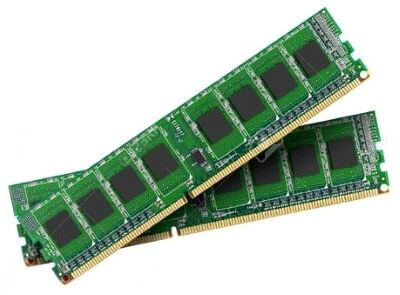
RAM is a volatile memory, which means it does not store data or instructions permanently. When you switch on the computer the data and instructions from the hard disk are stored in the RAM, e.g., when the computer is rebooted, and when you open a program, the operating system (OS), and the program are loaded into RAM, generally from an HDD or SSD. CPU utilizes this data to perform the required tasks. As soon as you shut down the computer, the RAM loses the data. So, the data remains in the RAM as long as the computer is on and lost when the computer is turned off. The benefit of loading data into RAM is that reading data from the RAM is much faster than reading from the hard drive.
In simple words, we can say that RAM is like a person?s short term memory, and hard drive storage is like a person's long term memory. Short term memory remembers the things for a short duration, whereas long term memory remembers for a long duration. Short term memory can be refreshed with information stored in the brain?s long term memory. A computer also works like this; when the RAM fills up, the processor goes to the hard disk to overlay the old data in Ram with new data. It is like a reusable scratch paper on which you can write notes, numbers, etc., with a pencil. If you run out of space on the paper, you may erase what you no longer need; RAM also behaves like this, the unnecessary data on the RAM is deleted when it fills up, and it is replaced with new data from the hard disk which is required for the current operations.
RAM comes in the form of a chip that is individually mounted on the motherboard or in the form of several chips on a small board connected to the motherboard. It is the main memory of a computer. It is faster to write to and read from as compared to other memories such as a hard disk drive (HDD), solid-state drive (SSD), optical drive, etc.
A computer's performance mainly depends on the size or storage capacity of the RAM. If it does not have sufficient RAM (random access memory) to run the OS and software programs, it will result in slower performance. So, the more RAM a computer has, the faster it will work. Information stored in RAM is accessed randomly, not in a sequence as on a CD or hard drive. So, its access time is much faster.
What is ROM?
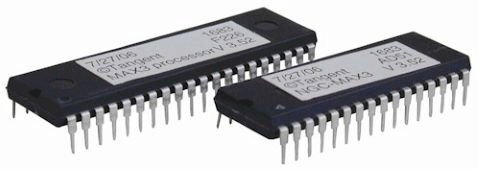
ROM, which stands for read only memory, is a memory device or storage medium that stores information permanently. It is also the primary memory unit of a computer along with the random access memory (RAM). It is called read only memory as we can only read the programs and data stored on it but cannot write on it. It is restricted to reading words that are permanently stored within the unit.
The manufacturer of ROM fills the programs into the ROM at the time of manufacturing the ROM. After this, the content of the ROM can't be altered, which means you can't reprogram, rewrite, or erase its content later. However, there are some types of ROM where you can modify the data.
ROM contains special internal electronic fuses that can be programmed for a specific interconnection pattern (information). The binary information stored in the chip is specified by the designer and then embedded in the unit at the time of manufacturing to form the required interconnection pattern (information). Once the pattern (information) is established, it stays within the unit even when the power is turned off. So, it is a non-volatile memory as it holds the information even when the power is turned off, or you shut down your computer.
The information is added to a RAM in the form of bits by a process known as programming the ROM as bits are stored in the hardware configuration of the device. So, ROM is a Programmable Logic Device (PLD).
A simple example of ROM is the cartridge used in video game consoles that allows the system to run many games. The data which is stored permanently on personal computers and other electronic devices like smartphones, tablets, TV, AC, etc. is also an example of ROM.
For example, when you start your computer, the screen does not appear instantly. It takes time to appear as there are startup instructions stored in ROM which are required to start the computer during the booting process. The work of the booting process is to start the computer. It loads the operating system into the main memory (RAM) installed on your computer. The BIOS program, which is also present in the computer memory (ROM) is used by the microprocessor of the computer to start the computer during the booting process. It allows you to open the computer and connects the computer with the operating system.
ROM is also used to store Firmware, which is a software program which remains attached to the hardware or programmed on a hardware device like a keyboard, hard drive, video cards, etc. It is stored in the flash ROM of a hardware device. It provides instructions to the device to communicate and interact with other devices.
Software
Software, which is abbreviated as SW or S/W, is a set of programs that enables the hardware to perform a specific task. All the programs that run the computer are software. The software can be of three types: system software, application software, and programming software.
1) System Software
The system software is the main software that runs the computer. When you turn on the computer, it activates the hardware and controls and coordinates their functioning. The application programs are also controlled by system software. An operating system is an example of system software.
i) Operating System:
An operating system is the system software that works as an interface to enable the user to communicate with the computer. It manages and coordinates the functioning of hardware and software of the computer. The commonly used operating systems are Microsoft Windows, Linux, and Apple Mac OS X.
Some other examples of system software include:
- BIOS: It stands for basic input output system. It is a type of system software, which is stored in Read Only Memory (ROM) located on the motherboard. However, in advanced computer systems, it is stored in flash memory. BIOS is the first software that gets activated when you turn on your computer system. It loads the drivers of the hard disk into memory as well as assists the operating system to load itself into the memory.
- Boot Program: Boot refers to starting up a computer. When you switch on the computer, the commands in the ROM are executed automatically to load the boot program into memory and execute its instructions. The BIOS program has a basic set of commands that enables the computer to perform the basic input/output instructions to start the computer.
- An assembler: It plays the role of a converter as it receives basic computer instructions and converts them into a pattern of bits. The processor uses these bits to perform basic operations.
- A device driver: This system software controls hardware devices connected to a computer. It enables the computer to use the hardware by providing an appropriate interface. The kernel of a Computer's CPU communicates with different hardware through this software. Operating systems generally come with most of the device drivers. If the operating system does not have a device driver for hardware, you have to install the device driver before using that hardware device.
2) Application Software:
Application software is a set of programs designed to perform a specific task. It does not control the working of a computer as it is designed for end-users. A computer can run without application software. Application software can be easily installed or uninstalled as required. It can be a single program or a collection of small programs. Microsoft Office Suite, Adobe Photoshop, and any other software like payroll software or income tax software are application software. As we know, they are designed to perform specific tasks. Accordingly, they can be of different types such as:
- Word Processing Software: This software allows users to create, edit, format, and manipulate the text and more. It offers lots of options for writing documents, creating images, and more. For example, MS Word, WordPad, Notepad, etc.
- Spreadsheet Software: It is designed to perform calculations, store data, create charts, etc. It has rows and columns, and the data is entered in the cell, which is an intersection of a row and column, e.g., Microsoft Excel.
- Multimedia Software: These software are developed to perform editing of video, audio, and text. It allows you to combine texts, videos, audio, and images. Thus, you can improve a text document by adding photos, animations, graphics, and charts through multimedia software. For example, VLC player, Window Media Player, etc.
- Enterprise Software: These software are developed for business operational functions. It is used in large organizations where the quantum of business is too large. It can be used for accounting, billing, order processing and more. For example, CRM (Customer Relationship Management), BI (Business Intelligence), ERP (Enterprise Resource Planning), SCM (Supply Chain Management), customer support system, and more.
3) Programming Software:
It is a set or collection of tools that help developers in writing other software or programs. It assists them in creating, debugging, and maintaining software or programs or applications. We can say that these are facilitator software that helps translate programming language such as Java, C++, Python, etc., into machine language code. So, it is not used by end-users. For example, compilers, linkers, debuggers, interpreters, text editors, etc. This software is also called a programming tool or software development tool.
Some examples of programming software include:
- Eclipse: It is a java language editor.
- Coda: It is a programming language editor for Mac.
- Notepad++: It is an open-source editor for windows.
- Sublime text: It is a cross-platform code editor for Linux, Mac, and Windows.
.png)

Comments
Post a Comment